中文English
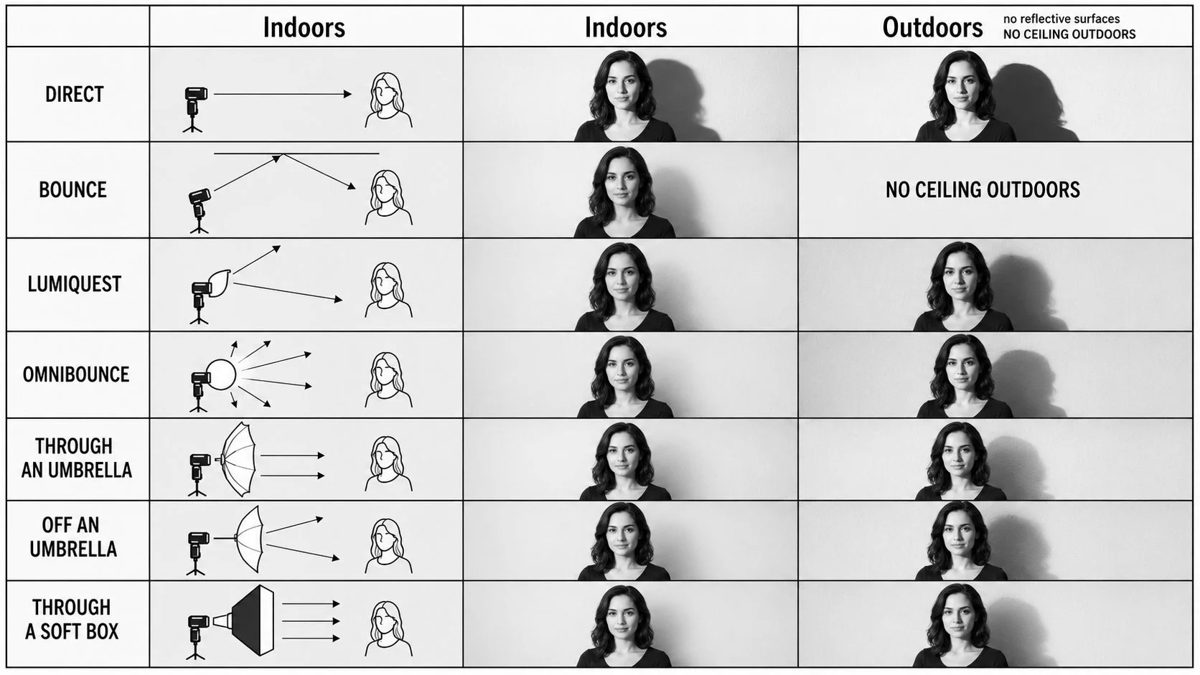
GPT Image 2 on ChatGPT。Prompt:创建清教育摄影灯光教学信息图 minimalist editorial 风格。布局为垂直 comparison chart,3 列 × 7 行。Top headers:左列 Indoors、中列 Indoors、右列 Outdoors;户外 header 旁加小注 no reflective surfaces 加 NO CEILING OUTDOORS。每行 compare 不同 flash 灯光法。展示同一女性 model 黑白对比 × 同一姿势,整张 chart 同一 simple top + 中长 dark 发 + realistic 表情 + classic studio portrait 感。Row 1 DIRECT:左 panel——simple technical lighting diagram showing direct flash aimed at subject;中 panel——indoor 硬 direct flash + 墙锐阴影;右 panel——outdoor 硬影 + 强对比。Row 2 BOUNCE:左——flash bounce off ceiling 灯光 diagram;中——indoor portrait 柔上弹光 + 柔墙影;右——text note 替照片 NO CEILING OUTDOORS。Row 3 LUMIQUEST:左——LumiQuest style bounced/diffused flash 灯光 diagram;中——indoor portrait soft 但 directional light;右——outdoor portrait 暗、defined 阴影。Row 4 OMNIBOUNCE:左——flash scatter multidirectional 灯光 diagram;中——indoor portrait 柔均匀光;右——outdoor portrait 多向反弹光照 + 更显阴影。Row 5 GEL / DIFFUSER 系列;Row 6 SOFTBOX;Row 7 BOUNCE CARD。Design style monochrome / black and white 清教学信息图 + 细黑边框每 panel + 浅灰背景 diagram panels + 简线 art technical diagrams with arrows showing light paths + 真实肖像摄影 example panels + 齐 All caps row labels + magazine quality educational reference sheet + balanced spacing and grid alignment + 高 clarity, easy to understand, professional tutorial layout。
Create a clean educational photography lighting tutorial infographic in a minimalist editorial style. The layout should be a vertical comparison chart with 3 columns and 7 rows.
Top headers:
Left column: Indoors
Middle column: Indoors
Right column: Outdoors
Include a small note near the outdoor header: no reflective surfaces and also a note saying NO CEILING OUTDOORS.
Each row should compare a different flash lighting method. Show the same female model in black-and-white portrait photos with the same pose across the chart, standing near a plain wall, wearing a simple top, medium-length dark hair, realistic expression, classic studio portrait look.
Row 1: DIRECT
Left panel: a simple technical lighting diagram showing direct flash aimed at the subject.
Middle panel: indoor result with hard direct flash and a sharp shadow on the wall.
Right panel: outdoor result with even harder shadow and stronger contrast.
Row 2: BOUNCE
Left panel: lighting diagram showing flash bouncing off the ceiling.
Middle panel: indoor portrait with softer upward bounced light and a gentler wall shadow.
Right panel: text note instead of photo saying "NO CEILING OUTDOORS".
Row 3: LUMIQUEST
Left panel: lighting diagram for LumiQuest style bounced/diffused flash.
Middle panel: indoor portrait with soft but directional light.
Right panel: outdoor portrait with darker, more defined shadow.
Row 4: OMNIBOUNCE
Left panel: lighting diagram showing flash scattered in multiple directions.
Middle panel: indoor portrait with diffused, room-filled light and softer shadow.
Right panel: outdoor portrait with stronger contrast and shadow because there are no reflective surfaces.
Row 5: THROUGH AN UMBRELLA
Left panel: diagram showing flash shooting through a translucent umbrella toward the subject.
Middle panel: indoor portrait with broad, soft light and smooth shadows.
Right panel: outdoor portrait with soft light on subject but still a noticeable shadow behind.
Row 6: OFF AN UMBRELLA
Left panel: diagram showing flash reflected off a white umbrella.
Middle panel: indoor portrait with soft reflected light and balanced contrast.
Right panel: outdoor portrait with more contrast and deeper background shadow.
Row 7: THROUGH A SOFT BOX
Left panel: diagram showing a rectangular softbox aimed at the subject.
Middle panel: indoor portrait with very soft, even professional lighting.
Right panel: outdoor portrait with soft directional lighting and a more visible shadow than indoors.
Design style:
monochrome / black and white
clean instructional infographic
thin black borders around each panel
light gray background in diagram panels
simple line art technical diagrams with arrows showing light paths
realistic portrait photography in the example panels
neat typography, all caps row labels
magazine quality educational reference sheet
balanced spacing and grid alignment
high clarity, easy to understand, professional tutorial layout.